2021 Rpi Pico micropython
la Rasperry Pi Pico 6€ est un micro controleur puissant programmable en micro python.
C’est une carte récente concurrençant les Arduino.
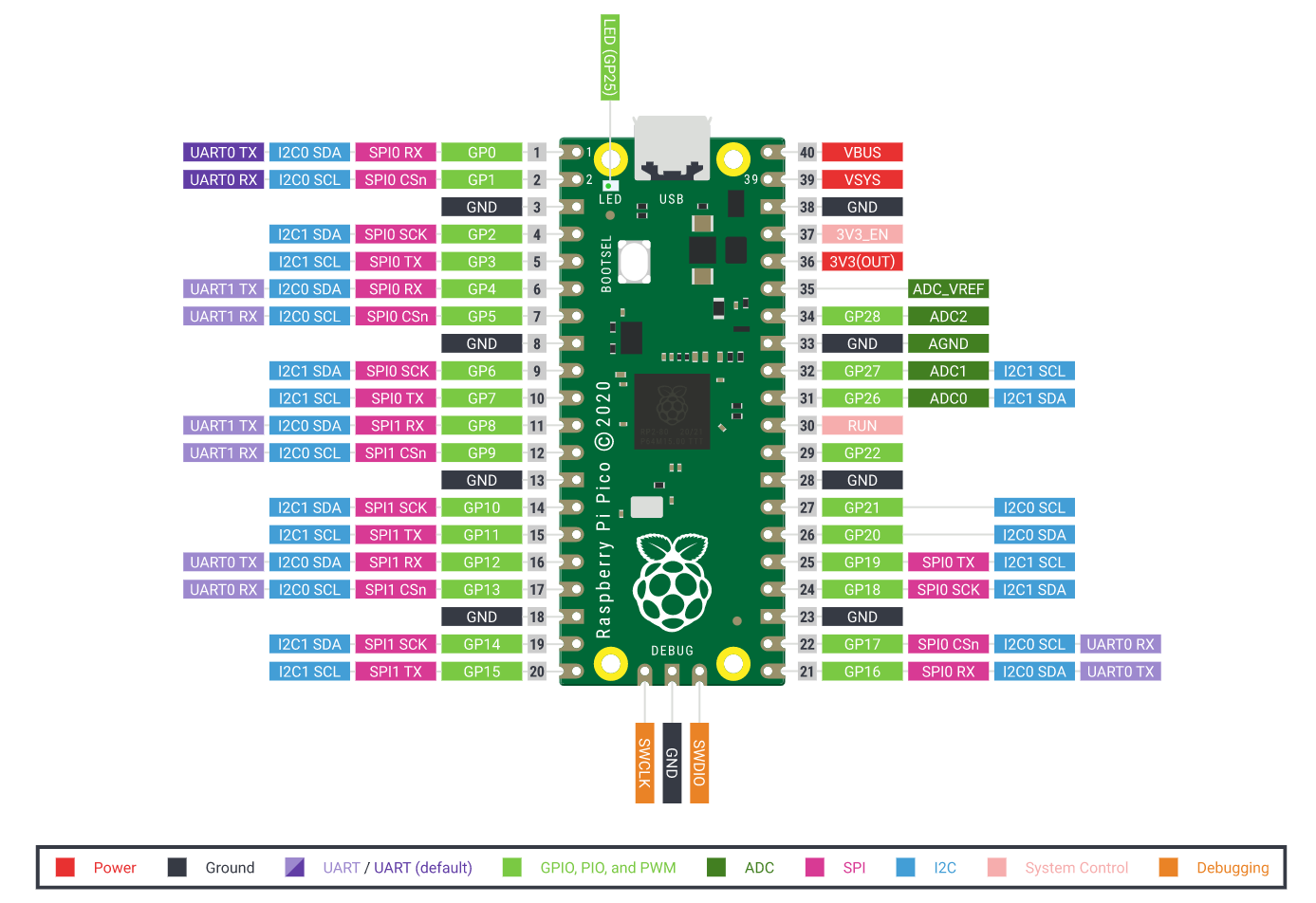
un IDE/Environnement de Développement Informatique Rapsberry Pi Pico est Thonny (téléchargement ici).
La led interne est sur le GPIO 25 qu’il faut définir avant de vouloir faire allumer/éteindre la led;
MicroPython v1.16 on 2021-06-18; Raspberry Pi Pico with RP2040
Type "help()" for more information.
>>> from machine import Pin
led = Pin(25, Pin.OUT)

led.toggle()
il suffira de retaper led.toggle() pour allumer/éteindre !
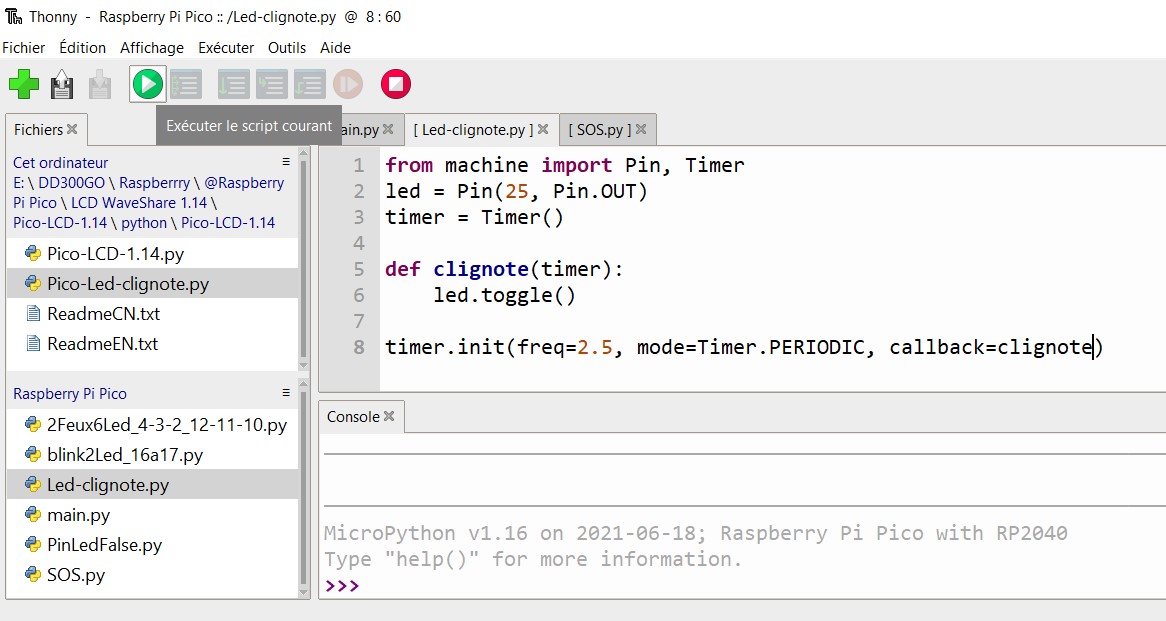
Pour définir une durée, il faut utiliser le module Timer:
from machine import Pin, Timer
led = Pin(25, Pin.OUT)
timer = Timer()

def clignote(timer):
    led.toggle()

timer.init(freq=3.5, mode=Timer.PERIODIC, callback=clignote)
toutes les commandes se passent dans Thonny
voici le code pour un feu tricolore:
méthode 1
from machine import Pin
from time import sleep

# Feux tricolores
F1V = Pin(16, Pin.OUT)
F1O = Pin(17, Pin.OUT)
F1R = Pin(18, Pin.OUT)

F2V = Pin(19, Pin.OUT)
F2O = Pin(20, Pin.OUT)
F2R = Pin(21, Pin.OUT)

Tempo = 5 #5s

while(True):
 #F1V_F2R
 F1V.value(True)
 F1O.value(False)
 F1R.value(False)
 F2V.value(False)
 F2O.value(False)
 F2R.value(True)
 sleep(Tempo)

 #F1O_F2R
 F1V.value(False)
 F1O.value(True)
 F1R.value(False)
 F2V.value(False)
 F2O.value(False)
 F2R.value(True)
 sleep(Tempo)

 #F1R_F2R
 F1V.value(False)
 F1O.value(False)
 F1R.value(True)
 F2V.value(False)
 F2O.value(False)
 F2R.value(True)
 sleep(Tempo/5)

 #F1R_F2V
 F1V.value(False)
 F1O.value(False)
 F1R.value(True)
 F2V.value(True)
 F2O.value(False)
 F2R.value(False)
 sleep(Tempo)

 #F1R_F2O
 F1V.value(False)
 F1O.value(False)
 F1R.value(True)
 F2V.value(False)
 F2O.value(True)
 F2R.value(False)
 sleep(Tempo)

 #F1R_F2R
 F1V.value(False)
 F1O.value(False)
 F1R.value(True)
 F2V.value(False)
 F2O.value(False)
 F2R.value(True)
 sleep(Tempo/5)
méthode 2
import RPi.GPIO as GPIO
import time
import signal
import sys

Vert =2
Orange =3
Rouge = 4

GPIO.setmode(GPIO.BCM)
GPIO.setup(Vert, GPIO.OUT) # vert
GPIO.setup(Orange, GPIO.OUT) # orange
GPIO.setup(Rouge, GPIO.OUT) # rouge

def allLightsOff(signal, frame):
 GPIO.output(Vert, False)
 GPIO.output(Orange, False)
 GPIO.output(Rouge, False)
 GPIO.cleanup()
 sys.exit(0)

signal.signal(signal.SIGINT, allLightsOff)
print('[CTRL + C pour terminer]')

while True:
 GPIO.output(Rouge,True) # rouge allumé
 time.sleep(3)
 GPIO.output(Rouge,False) # rouge allumé
 #
 GPIO.output(Vert,True) # vert allumé
 time.sleep(5)
 GPIO.output(Vert,False) # vert éteint
 #
 GPIO.output(Orange,True) # orange allumé
 time.sleep(2)
 GPIO.output(Orange,False) # orange allumé
anneau 16 Leds ws2812
# Example using PIO to drive a set of WS2812 LEDs.

import array, time
from machine import Pin
import rp2

# Configure the number of WS2812 LEDs.
NUM_LEDS = 16
PIN_NUM = 6
brightness = 0.2

@rp2.asm_pio(sideset_init=rp2.PIO.OUT_LOW, out_shiftdir=rp2.PIO.SHIFT_LEFT, autopull=True,
pull_thresh=24)
def ws2812():
 T1 = 2
 T2 = 5
 T3 = 3
 wrap_target()
 label("bitloop")
 out(x, 1) .side(0) [T3 - 1]
 jmp(not_x, "do_zero") .side(1) [T1 - 1]
 jmp("bitloop") .side(1) [T2 - 1]
 label("do_zero")
 nop() .side(0) [T2 - 1]
 wrap()

# Create the StateMachine with the ws2812 program, outputting on pin
sm = rp2.StateMachine(0, ws2812, freq=8_000_000, sideset_base=Pin(PIN_NUM))

# Start the StateMachine, it will wait for data on its FIFO.
sm.active(1)

# Display a pattern on the LEDs via an array of LED RGB values.
ar = array.array("I", [0 for _ in range(NUM_LEDS)])

##########################################################################
def pixels_show():
 dimmer_ar = array.array("I", [0 for _ in range(NUM_LEDS)])
 for i,c in enumerate(ar):
 r = int(((c >> 8) & 0xFF) * brightness)
 g = int(((c >> 16) & 0xFF) * brightness)
 b = int((c & 0xFF) * brightness)
 dimmer_ar[i] = (g<<16) + (r<<8) + b
 sm.put(dimmer_ar, 8)
 time.sleep_ms(10)

def pixels_set(i, color):
 ar[i] = (color[1]<<16) + (color[0]<<8) + color[2]

def pixels_fill(color):
 for i in range(len(ar)):
 pixels_set(i, color)

def color_chase(color, wait):
 for i in range(NUM_LEDS):
 pixels_set(i, color)
 time.sleep(wait)
 pixels_show()
 time.sleep(0.2)

def wheel(pos):
 # Input a value 0 to 255 to get a color value.
 # The colours are a transition r - g - b - back to r.
 if pos < 0 or pos > 255:
 return (0, 0, 0)
 if pos < 85:
 return (255 - pos * 3, pos * 3, 0)
 if pos < 170:
 pos -= 85
 return (0, 255 - pos * 3, pos * 3)
 pos -= 170
 return (pos * 3, 0, 255 - pos * 3)

def rainbow_cycle(wait):
 for j in range(255):
 for i in range(NUM_LEDS):
 rc_index = (i * 256 // NUM_LEDS) + j
 pixels_set(i, wheel(rc_index & 255))
 pixels_show()
 time.sleep(wait)

BLACK = (0, 0, 0)
RED = (255, 0, 0)
YELLOW = (255, 150, 0)
GREEN = (0, 255, 0)
CYAN = (0, 255, 255)
BLUE = (0, 0, 255)
PURPLE = (180, 0, 255)
WHITE = (255, 255, 255)
COLORS = (BLACK, RED, YELLOW, GREEN, CYAN, BLUE, PURPLE, WHITE)

print("fills")
for color in COLORS:
 pixels_fill(color)
 pixels_show()
 time.sleep(0.5)

print("chases")
for color in COLORS:
 color_chase(color, 0.02)

print("rainbow")
rainbow_cycle(0)

# Eteindre les LED après 2 secondes
time.sleep(2)
pixels_fill(BLACK)
pixels_show()