Arduino 2019-6a: montage ServoMoteur avec UltraSon HC-SR04 _ Processing
bricolage:
consignes pour monter le servomoteur avec le capteur UltraSon HC-SR04:
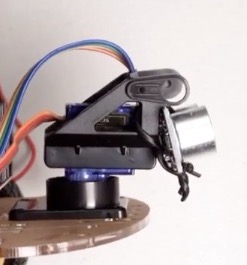
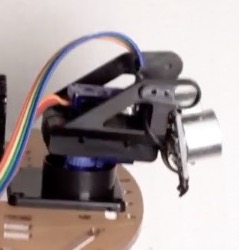
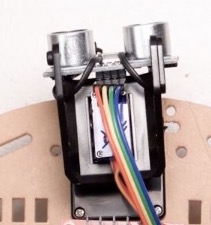
Montage 1:2 servomoteur Ultrason SR04
Montage 2:2 servomoteur Ultrason SR04
programmes: Crepp_radar.ino
le servomoteur va tourner lentement de gauche à droite puis de droite à gauche, permettant au capteur ultrason de mesurer la distance par rapport au plus proche objet.
Le programme envoie à la fenêtre terminal le couple de donnée degré,distance.
code Arduino
// ajout bibliothèque du servo moteur
#include <Servo.h>.

// Definition broches Trig et Echo pour ultrason
const int trigPin = 10;
const int echoPin = 11;
const float VitesseSon = 0.034; // vitesse son= 340 m/s

// Variables duree et distance
long duree;
int distance;

// objet servo moteur pour controler le servo
Servo myServo;

/*
 ********************************************************************************
*/
void setup() {
  pinMode(trigPin, OUTPUT); // trigPin en Sortie
  pinMode(echoPin, INPUT); // echoPin en entrée
  Serial.begin(9600);
  myServo.attach(12); // pin du servo moteur
}
/*
 ********************************************************************************
*/
void loop() {
 // rotation du servo motor de 15 à 165 degres
 for(int i=15;i<=165;i++){
    myServo.write(i);
    delay(30);
    // appel fonction de calcul de la distance
    // mesurée par le capteur Ultrasonic pour chaque degré
    distance = calculateDistance();
    Serial.print(i); // envoie angle en degré sur le port série
    Serial.print(","); // ajout de , pour séparer les données pour Processing
    Serial.print(distance); // envoie distance sur le port série
    Serial.print("."); // ajout de . pour terminer les données pour Processing
 }
 // idem pour le retour de 165 à 15 degres
 for(int i=165;i>15;i--){
    myServo.write(i);
    delay(30);
    // appel fonction de calcul de la distance
    // mesurée par le capteur Ultrasonic pour chaque degré
    distance = calculateDistance();
    Serial.print(i);
    Serial.print(",");
    Serial.print(distance);
    Serial.print(".");
 }
}
/*
 ********************************************************************************
*/
// Fonction de calcul de la distance mesurée par le capteur UltraSonic
int calculateDistance(){

   digitalWrite(trigPin, LOW);
   delayMicroseconds(2);
   // trigPin à HIGH state pour 10 micro secondes
   digitalWrite(trigPin, HIGH);
   delayMicroseconds(10);
   digitalWrite(trigPin, LOW);
   duree = pulseIn(echoPin, HIGH);
   // lit echoPin pour mesurer le parcours du son en micro secondes
   // 2: mesure aller +retour
   distance= duree*VitesseSon/2;
   return distance;
}
on obtient des données de type degré,distance obstacle. et dans le terminal on lit les résultats:

utilisons Processing pour mettre en forme ces données en temps réel sous forme d’un graphique.
logiciel Processing
1er pas dans la programmation créative car nous utiliserons Processing pour la mise en page, en image des données acquises en temps réel sur l’Arduino _ ici la distance mesurée par le capteur ultra-son HC-SR04_
Il faut installer Processing sur votre micro-ordinateur:
Windows 64 bit, ( Windows 32 bit ), Linux 64 bit, Mac OSX,
Référence des instructions Processing à notre disposition
voici une présentation des possibilités de base de Processing:
quelques exemples ICI
on va utliser quelques fonctions de dessin/traçage de Processing
size (400, 500); // taille affichage
fill(98,245,31); // fond vert
rect(0, 0, width, height-height*0.065); // un rectangle borde l'affichage pour faire joli !

// arc de cercle commençant en x:200, y:200, largeur, hauteur,

//                                angle début en radian, angle fin radian,

//                                 façon de terminer le dessin: CHORD/OPEN/TWO_PI/PIE _tarte!_ )
arc(200, 200, 300, 300, 0, PI+QUARTER_PI, PIE);
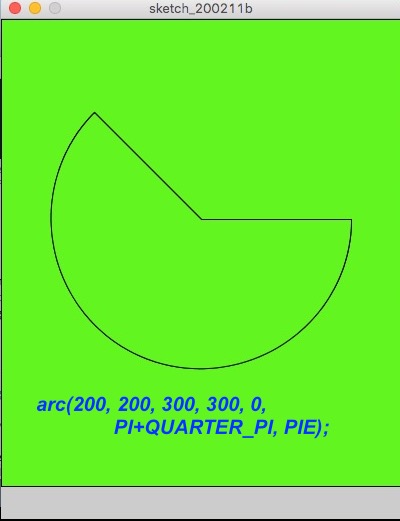
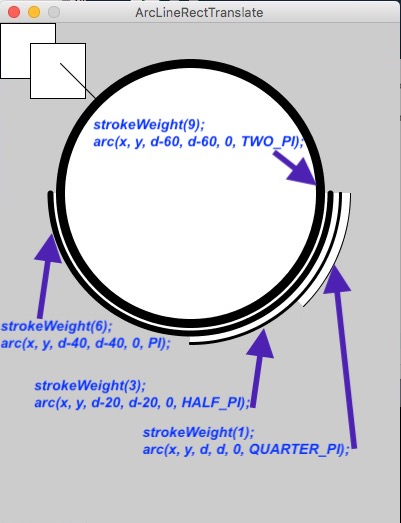
couleur: R/Rouge, G/Vert, B/Bleu

fill(0,0,255);  // bleu

fill(50);   // noir
programme: Crepp_radar.pde
import processing.serial.*; // imports library for serial communication
import java.awt.event.KeyEvent; // imports library for reading the data from the serial port
import java.io.IOException;

// *
// nouvel objet port série ...
// où arrive le flux de données Arduino
Serial myPort;

// *
// définition des variables
String angle="";
String distance="";
String data="";
String noObject;
float pixsDistance;
int iAngle, iDistance;
int index1=0;
int index2=0;
int RadarLimite=40; // on se limite à scanner 40 cm
PFont orcFont;

// rappel couleur RGB
// http://www.proftnj.com/RGB3.htm
// stroke(r,g,b) et fill(r,g,b)
// (255,10,10)red color, stroke(0,0,255) red blue
// (255, 255,0); red yellow, (154,205,50); red yellow green, (98,245,31); vert
// (98,245,31); vert, (30,250,60); vert sombre, (98,245,31); vert vif
// (0,4,0); noir,


// *
// ***********************************
void setup() {
 // *
 // résolution écran
 size (1200, 700);
 smooth();
 //myPort = new Serial(this,"COM5", 9600); // starts the serial communication
 myPort = new Serial(this,"/dev/cu.usbmodemFA131", 9600); // starts the serial communication
 myPort.bufferUntil('.'); // reads the data from the serial port up to the character '.'. So actually it reads this: angle,distance.
}

//*
// ***********************************
void draw() {
 fill(98,245,31); // vert
 // simulating motion blur and slow fade of the moving line
 noStroke();
 fill(0,4); // noir
 rect(0, 0, width, height-height*0.065);

 fill(98,245,31); // green color
 // appels des focntions pour dessiner le radar
 drawRadar();
 drawLine();
 drawObject();
 drawText();
}

// *
// ***********************************
void serialEvent (Serial myPort) {
 // début de lecture des données du port Série
 // découpage des données issues du port Série:
 // au caractère de fin de données "." on place les données dans la variable "data"
 data = myPort.readStringUntil('.');
 data = data.substring(0,data.length()-1);

 // trouve le caractère "," et on place les dans la variable "index1"
 index1 = data.indexOf(",");

 // ainsi la variable "angle" est la partie de "data"
 // du 1er caractère de "data" au "index" ième caratère
 angle= data.substring(0, index1);

 // ainsi la variable "distance" est la partie de "data"
 // du "index+1" ième caratère à la fin _= data.length() _
 distance= data.substring(index1+1, data.length());

 // conversion des variables en entier pour la suite des calculs
 iAngle = int(angle);
 iDistance = int(distance);
}

// *
// ***********************************
void drawRadar() {
 pushMatrix();
 // nouvelle origine des coordonées
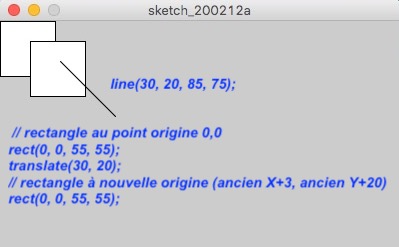
 translate(width/2,height-height*0.074);
 noFill();
 strokeWeight(2);
 stroke(98,245,31); // vert

 // dessine des lignes des arcs de cercle
 arc(0,0,(width-width*0.0625),(width-width*0.0625),PI,TWO_PI);
 arc(0,0,(width-width*0.27),(width-width*0.27),PI,TWO_PI);
 arc(0,0,(width-width*0.479),(width-width*0.479),PI,TWO_PI);
 arc(0,0,(width-width*0.687),(width-width*0.687),PI,TWO_PI);

 // dessine les lignes des angles
 line(-width/2,0,width/2,0);
 line(0,0,(-width/2)*cos(radians(30)),(-width/2)*sin(radians(30)));
 line(0,0,(-width/2)*cos(radians(60)),(-width/2)*sin(radians(60)));
 line(0,0,(-width/2)*cos(radians(90)),(-width/2)*sin(radians(90)));
 line(0,0,(-width/2)*cos(radians(120)),(-width/2)*sin(radians(120)));
 line(0,0,(-width/2)*cos(radians(150)),(-width/2)*sin(radians(150)));
 line((-width/2)*cos(radians(30)),0,width/2,0);
 popMatrix();
}

// *
// *****************
void drawObject() {
 pushMatrix();
 // nouvelle origine des coordonées
 translate(width/2,height-height*0.074);
 strokeWeight(9);
 stroke(255,10,10); // rouge
 stroke(#0055FF);   // bleu
 // calcule la distance de cm en pixels
 pixsDistance = iDistance*((height-height*0.1666)*0.025);

 // portée limite à distance 40 cm
 if(iDistance<RadarLimite){
 // dessine en focntion de l'angle et de la diastance
 line(pixsDistance*cos(radians(iAngle)),-pixsDistance*sin(radians(iAngle)),(width-width*0.505)*cos(radians(iAngle)),-(width-width*0.505)*sin(radians(iAngle)));
 }
 popMatrix();
}

// *
// ***********************

// *
// *****************
void drawObject_old() {
 pushMatrix();
 // nouvelle origine des coordonées
 translate(width/2,height-height*0.074);
 strokeWeight(9);
 stroke(255,10,10); // rouge

 // calcule la distance de cm en pixels
 pixsDistance = iDistance*((height-height*0.1666)*0.025);

 // portée limite à distance 40 cm
 if(iDistance<RadarLimite){
 // dessine en focntion de l'angle et de la distance
 line(pixsDistance*cos(radians(iAngle)),-pixsDistance*sin(radians(iAngle)),(width-width*0.505)*cos(radians(iAngle)),-(width-width*0.505)*sin(radians(iAngle)));
 }
 popMatrix();
}

// *
// *************************
void drawLine() {
 pushMatrix();
 strokeWeight(9);
 stroke(30,250,60); // vert sombre
 // origine des coordonnées décallées
 translate(width/2,height-height*0.074);
 // dessine en focntion de l'angle
 line(0,0,(height-height*0.12)*cos(radians(iAngle)),-(height-height*0.12)*sin(radians(iAngle)));
 popMatrix();
}

// *
// ***********************************
void drawText() {
 // affiche le texte à l'écran

 pushMatrix();
 if(iDistance>40) {
 noObject = "hors portée";
 }
 else {
 noObject = "radar en focntion";
 }
 fill(0,0,0);
 noStroke();
 rect(0, height-height*0.0648, width, height);
 fill(98,245,31); // vert vif
 textSize(25);

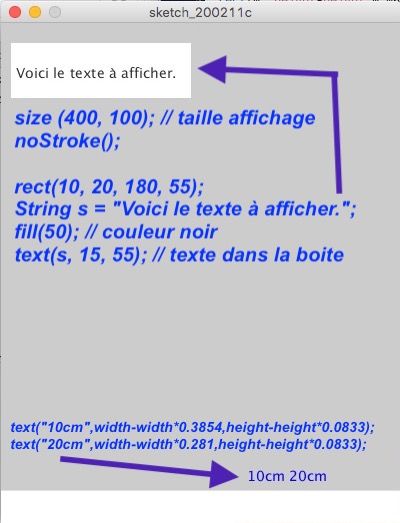
 text("10cm",width-width*0.3854,height-height*0.0833);
 text("20cm",width-width*0.281,height-height*0.0833);
 text("30cm",width-width*0.177,height-height*0.0833);
 text("40cm",width-width*0.0729,height-height*0.0833);
 textSize(40);
 text(" CREPP 2020", width-width*0.9, height-height*0.0277);
 text("Angle: " + iAngle +" °", width-width*0.6, height-height*0.0277);
 text("Distance: ", width-width*0.3, height-height*0.0277);
 if(iDistance<40) {
 text(" " + iDistance +" cm", width-width*0.225, height-height*0.0277);
 }
 textSize(25);
 fill(98,245,60); // vert
 translate((width-width*0.4994)+width/2*cos(radians(30)),(height-height*0.0907)-width/2*sin(radians(30)));
 rotate(-radians(-60));
 text("30°",0,0);
 resetMatrix();
 translate((width-width*0.503)+width/2*cos(radians(60)),(height-height*0.0888)-width/2*sin(radians(60)));
 rotate(-radians(-30));
 text("60°",0,0);
 resetMatrix();
 translate((width-width*0.507)+width/2*cos(radians(90)),(height-height*0.0833)-width/2*sin(radians(90)));
 rotate(radians(0));
 text("90°",0,0);
 resetMatrix();
 translate(width-width*0.513+width/2*cos(radians(120)),(height-height*0.07129)-width/2*sin(radians(120)));
 rotate(radians(-30));
 text("120°",0,0);
 resetMatrix();
 translate((width-width*0.5104)+width/2*cos(radians(150)),(height-height*0.0574)-width/2*sin(radians(150)));
 rotate(radians(-60));
 text("150°",0,0);
 popMatrix();
}